Summarize this blog post with:


Quick Summary
WordPress security is important for businesses to protect their websites from malware, unauthorised access, data breaches, and performance issues. With WordPress being widely used worldwide, websites can become targets for attacks caused by outdated plugins, weak passwords, vulnerable themes, and poor security practices.
This guide covers essential WordPress security practices, including regular updates, secure hosting, SSL protection, backups, two-factor authentication, malware scanning, and activity monitoring. Implementing these measures helps businesses reduce security risks, protect customer data, and maintain a safe and reliable online presence.
- Key Takeaways
- 20 WordPress Security Tips to Protect Your Business Website
- Why WordPress Security Matters for Business Websites
- ◈ Growing Cybersecurity Threats Against WordPress Websites
- ◈ Common WordPress Security Issues Businesses Face
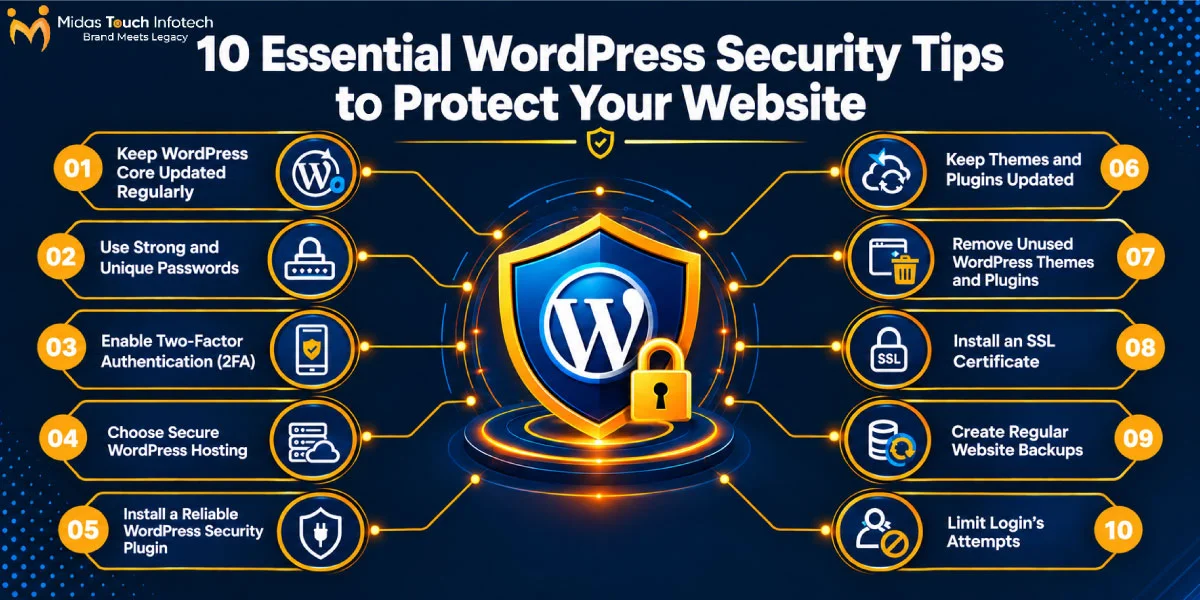
- 20 WordPress Security Tips to Protect Your Business Website
- 1. Keep WordPress Core Updated Regularly
- 2. Use Strong and Unique Passwords
- 3. Enable Two-Factor Authentication (2FA)
- 4. Choose Secure WordPress Hosting
- 5. Install a Reliable WordPress Security Plugin
- 6. Keep Themes and Plugins Updated
- 7. Remove Unused WordPress Themes and Plugins
- 8. Install an SSL Certificate
- 9. Create Regular Website Backups
- 10. Limit Login Attempts
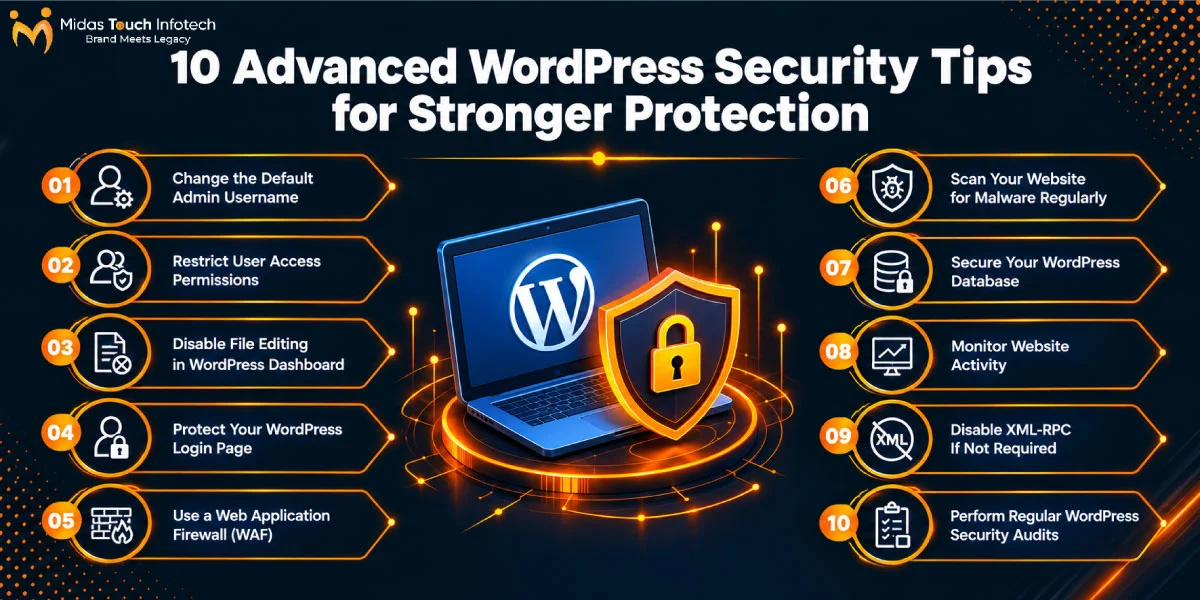
- 11. Change the Default Admin Username
- 12. Restrict User Access Permissions
- 13. Disable File Editing in WordPress Dashboard
- 14. Protect Your WordPress Login Page
- 15. Use a Web Application Firewall (WAF)
- 16. Scan Your Website for Malware Regularly
- 17. Secure Your WordPress Database
- 18. Monitor Website Activity
- 19. Disable XML-RPC If Not Required
- 20. Perform Regular WordPress Security Audits
- WordPress Security Checklist: Visual Guide for Business Websites
- ◈ Update WordPress Core Regularly
- ◈ Use Strong Passwords and 2FA
- ◈ Secure Your Website with SSL
- ◈ Create Regular Website Backups
- ◈ Scan for Malware Regularly
- ◈ Review User Access Permissions
- Ready to Strengthen Your WordPress Website Security?
20 WordPress Security Tips to Protect Your Business Website
In today’s digital landscape, a business website is one of the most important assets for building customer trust, generating leads, and supporting online growth. However, as businesses increasingly depend on websites for daily operations, cybersecurity threats have also become more advanced. WordPress powers a significant portion of websites worldwide, making it a popular target for attackers looking to exploit vulnerabilities, steal sensitive information, or disrupt business operations.
According to recent cybersecurity reports, more than 43% of all websites worldwide are built on WordPress, making it the most widely used content management system. Due to its popularity, WordPress websites are frequently targeted by malware attacks, brute-force login attempts, plugin vulnerabilities, and unauthorised access attempts. Businesses need proactive protection measures to prevent security incidents that can impact website performance, customer trust, and revenue.
Website security is not only about preventing attacks but also about maintaining a reliable digital experience for customers. A compromised website can lead to malware infections, data breaches, website downtime, loss of search rankings, and damage to brand reputation. Investing in professional wordpress website development services helps businesses create secure websites with proper configurations, reliable coding practices, and security-focused development approaches from the beginning.
Common WordPress security risks include outdated plugins and themes, weak passwords, insecure hosting environments, malicious code injections, and improper user permissions. Whether a business operates an eCommerce store, service website, or corporate platform, implementing effective wordpress security tips is essential to protect valuable data and maintain website reliability. This guide covers practical and advanced security measures businesses can follow to strengthen their WordPress websites and reduce potential risks.
Why WordPress Security Matters for Business Websites
◈ Growing Cybersecurity Threats Against WordPress Websites
WordPress powers millions of websites globally, including small businesses, startups, enterprises, blogs, and eCommerce platforms. Its popularity makes it an attractive target for cybercriminals who use automated systems to identify websites with security weaknesses. Attackers often target outdated plugins, vulnerable themes, and weak login credentials to gain unauthorised access.
Many small and medium-sized businesses assume that cyberattacks only target large organisations, but this is not true. Smaller websites are also vulnerable because attackers often use automated attacks that scan thousands of websites to find security gaps. Without proper protection, even a small business website can become a victim of malware infections, data theft, or website disruption.
A compromised WordPress website can create serious business challenges. Security breaches may result in loss of customer trust, reduced search rankings, revenue loss, and long-term brand damage. Search engines may also blacklist infected websites, making it difficult for customers to access the site. Following proper tips for wordpress security helps businesses reduce these risks and maintain a safer online presence.
◈ Common WordPress Security Issues Businesses Face
One of the most common WordPress security problems is the use of outdated themes, plugins, and WordPress versions. Developers regularly release updates to fix security vulnerabilities, improve performance, and enhance functionality. When businesses delay updates, attackers can exploit known weaknesses to gain access to websites.
Weak passwords and poor access management are another major security concern. Using simple passwords or sharing administrator credentials increases the chances of unauthorised login attempts. Businesses should create strong passwords, enable additional verification methods, and regularly review user permissions to prevent unwanted access.
Poor hosting security can also impact website protection. Low-quality hosting providers may lack essential security features such as malware scanning, firewalls, backups, and server monitoring. Choosing secure hosting and implementing advanced wordpress security tips can help businesses create a stronger defence against potential attacks.
Other common security issues include malware injections, suspicious code changes, spam attacks, SQL injection attempts, and unauthorised user activity. Regular security monitoring, vulnerability scanning, and website maintenance help identify these problems before they cause significant damage.
20 WordPress Security Tips to Protect Your Business Website
Protecting a WordPress website requires a proactive approach that combines technical improvements, regular monitoring, and secure management practices. The following security measures help businesses strengthen their websites and minimise potential vulnerabilities.
1. Keep WordPress Core Updated Regularly
Keeping the WordPress core updated is one of the most basic yet important security practices. WordPress releases regular updates that include security patches, bug fixes, and performance improvements. These updates help protect websites from newly discovered vulnerabilities and improve overall website stability.
Businesses should regularly check for available updates and install them after proper testing. Automatic updates can be enabled for suitable environments, especially for minor security releases. Working with a best wordpress development agency can also help businesses manage updates safely while ensuring website functionality remains unaffected.
Regular updates not only improve security but also ensure compatibility with modern plugins, themes, and web technologies. Maintaining an updated WordPress installation creates a stronger foundation for protecting business websites from potential attacks.
2. Use Strong and Unique Passwords
Strong passwords are one of the simplest ways to improve WordPress security. Weak or commonly used passwords make it easier for attackers to perform brute-force attacks and gain access to administrator accounts. Businesses should create complex passwords that include a combination of uppercase letters, lowercase letters, numbers, and special characters.
Passwords should be unique for every account, including WordPress admin accounts, hosting panels, database access, and email accounts connected to the website. Reusing passwords across multiple platforms increases security risks if one account becomes compromised.
Using a password manager can help businesses securely store and manage complex passwords. Regular password updates and restricted access to administrative accounts further improve protection against unauthorised login attempts.
3. Enable Two-Factor Authentication (2FA)
Two-factor authentication (2FA) adds an extra security layer to WordPress login processes by requiring users to verify their identity through an additional method after entering their password. Even if an attacker obtains a user’s password, they cannot access the website without completing the second verification step.
Businesses can use authentication apps, security plugins, or verification codes sent through trusted channels to enable 2FA. This security measure is especially important for administrator accounts because these accounts have complete control over website settings, content, plugins, and user permissions.
Implementing 2FA is one of the most effective wordpress website security tips because it significantly reduces the risk of unauthorised access caused by stolen or weak passwords. For businesses managing multiple users, 2FA ensures that every account has an additional protection layer.
4. Choose Secure WordPress Hosting
The hosting environment plays an important role in website security. A secure hosting provider offers essential protection features such as malware scanning, firewall management, server monitoring, SSL support, and automated backups. Choosing reliable hosting helps businesses protect their website files, databases, and customer information.
Low-quality hosting providers may create security risks due to outdated server configurations, poor monitoring, or limited protection features. Businesses should select hosting solutions that provide regular security updates, strong server infrastructure, and technical support when security issues occur.
A secure hosting environment also improves website performance and reliability. When combined with proper development practices from a trusted wordpress web development company, secure hosting creates a strong foundation for protecting business websites from cyber threats.
5. Install a Reliable WordPress Security Plugin
Security plugins provide additional protection by monitoring website activity, detecting threats, and preventing suspicious behaviour. These plugins can help businesses identify malware, block harmful traffic, protect login pages, and manage firewall settings.
Reliable security plugins often include features such as malware scanning, login protection, vulnerability monitoring, IP blocking, and security alerts. These tools continuously monitor website activity and notify administrators about potential security concerns.
However, businesses should install security plugins only from trusted sources because poorly developed plugins can introduce additional vulnerabilities. Selecting the right security tools and configuring them properly helps strengthen website protection.
6. Keep Themes and Plugins Updated
WordPress themes and plugins add functionality and design features to websites, but outdated versions can become security risks. Attackers frequently target vulnerable plugins and themes because they can provide entry points into websites. Regular updates help fix known vulnerabilities and improve compatibility with the latest WordPress versions.
Businesses should regularly review installed themes and plugins and update them whenever new versions are available. Before updating major components, it is recommended to create backups and test changes to avoid website performance issues.
Another important security practice is downloading plugins and themes only from trusted developers or official marketplaces. Professional wordpress website development services providers follow secure development practices and help businesses maintain reliable website components.
7. Remove Unused WordPress Themes and Plugins
Unused themes and plugins can create unnecessary security risks because outdated components may contain vulnerabilities even when they are not actively used. Attackers can exploit these weaknesses to gain access to websites if inactive software remains installed.
Businesses should regularly review their WordPress dashboard and remove unnecessary themes, plugins, and extensions. Keeping only essential tools reduces the number of possible attack points and improves website performance.
A clean WordPress installation is easier to maintain and monitor. Regularly removing unused components is one of the basic but effective basic wordpress security tips that helps businesses maintain a safer website environment.
8. Install an SSL Certificate
An SSL certificate encrypts communication between website visitors and the server, protecting sensitive information such as login credentials, contact details, and payment information. Websites with SSL enabled use HTTPS, which provides users with a safer browsing experience.
SSL certificates also improve customer trust because visitors are more likely to interact with websites that display secure connection indicators. Search engines also consider website security as an important factor when evaluating user experience.
For businesses operating online, SSL protection is essential for maintaining credibility and protecting customer data. Whether it is a corporate website, service platform, or eCommerce store, HTTPS should be a standard security requirement.
9. Create Regular Website Backups
Regular backups are an essential part of WordPress security because they allow businesses to restore their websites quickly after security incidents, server failures, or accidental changes. Without proper backups, recovering a compromised website can become difficult and expensive.
Businesses should schedule automatic backups and store copies in multiple secure locations, such as cloud storage or external backup systems. Backups should include important website elements such as files, databases, media content, themes, and plugins.
A reliable backup strategy ensures business continuity and reduces downtime during unexpected situations. Many professional WordPress developers include backup management as part of ongoing website maintenance services to provide additional protection.
10. Limit Login Attempts
Limiting login attempts helps protect WordPress websites from brute-force attacks, where attackers repeatedly try different username and password combinations to gain access. By restricting the number of failed login attempts, businesses can prevent automated attacks and block suspicious users.
Security plugins and firewall tools can automatically limit login attempts, temporarily block suspicious IP addresses, and monitor unusual login behaviour. These measures reduce the chances of unauthorised access to administrator accounts.
For businesses managing important websites, login protection should be a priority. A custom wordpress development company can implement additional security configurations to strengthen login systems and protect sensitive website areas.
11. Change the Default Admin Username
Many automated attacks target websites that use common administrator usernames such as “admin.” Keeping default usernames increases the chances of successful brute-force attempts because attackers already know half of the login information.
Businesses should create unique administrator usernames that are difficult to guess. Existing websites using default usernames should update account settings carefully while ensuring proper user permissions remain intact.
Using unique usernames along with strong passwords and two-factor authentication creates a stronger defence against unauthorised login attempts.
12. Restrict User Access Permissions
Managing user access permissions is an important step in protecting a WordPress website, especially for businesses with multiple team members, developers, editors, and administrators. Not every user requires complete access to website settings. Providing unnecessary permissions can increase security risks because compromised accounts may allow attackers to make unauthorised changes.
Businesses should follow the principle of least privilege by assigning users only the access they need to complete their tasks. WordPress provides different user roles, such as administrator, editor, author, contributor, and subscriber, which help control website access levels. Regularly reviewing and removing inactive user accounts can further improve website security.
Proper access management is one of the essential tips for wordpress security because it reduces the chances of accidental changes, data exposure, and unauthorised activities. Businesses working with professional developers should also ensure that temporary access given to external users is removed after project completion.
13. Disable File Editing in WordPress Dashboard
WordPress allows administrators to edit theme and plugin files directly from the dashboard. While this feature can be useful for developers, keeping it enabled can create security risks if an attacker gains access to an administrator account. Hackers may use this option to insert malicious code into website files.
Disabling file editing prevents unauthorised users from making direct code changes through the WordPress dashboard. Businesses can disable this feature by modifying WordPress configuration settings or using security plugins that provide additional protection.
For websites that require regular development changes, it is better to use secure development environments and professional support from a custom wordpress development company. This approach ensures that website modifications are performed safely without exposing important files to unnecessary risks.
14. Protect Your WordPress Login Page
The WordPress login page is one of the most targeted areas of a website because attackers often use automated tools to perform brute-force login attempts. Protecting the login page helps prevent unauthorised access and reduces the chances of successful attacks.
Businesses can improve login security by changing default login URLs, adding CAPTCHA verification, limiting login attempts, and monitoring suspicious login activities. These additional measures make it more difficult for attackers to access administrator accounts.
Regular monitoring of login activity also helps identify unusual behaviour, such as repeated failed attempts or access from unknown locations. Combining login protection with strong passwords and two-factor authentication creates a stronger security layer for business websites.
15. Use a Web Application Firewall (WAF)
A Web Application Firewall (WAF) helps protect websites by filtering and blocking malicious traffic before it reaches the website server. It acts as a security barrier that identifies suspicious requests and prevents common cyber threats from affecting website operations.
A WAF can protect WordPress websites against various attacks, including SQL injections, cross-site scripting (XSS), malicious bots, and automated attack attempts. By analysing incoming traffic patterns, it can block harmful activities while allowing legitimate visitors to access the website.
Implementing a firewall solution is one of the important advanced wordpress security tips for businesses that want stronger protection. A properly configured WAF helps reduce security risks and provides an additional defence layer beyond basic website protection methods.
16. Scan Your Website for Malware Regularly
Regular malware scanning helps businesses identify suspicious files, malicious scripts, and unauthorised changes before they create serious problems. Cybercriminals often hide malware inside website files, making it difficult to detect without proper security monitoring.
Businesses should perform regular security scans using trusted tools to check for malware infections, vulnerabilities, and unusual activities. Early detection allows website owners to remove threats quickly and reduce potential damage.
Regular malware monitoring is especially important for business websites that handle customer information or generate online revenue. Including security scans as part of website maintenance helps maintain a safer and more reliable online presence.
17. Secure Your WordPress Database
The WordPress database stores important website information, including user details, website settings, posts, pages, and configuration data. Protecting the database is essential because unauthorised access can result in data loss, website manipulation, or sensitive information exposure.
Businesses can improve database security by changing default database prefixes, using strong database credentials, restricting database access, and keeping database configurations secure. Regular backups also ensure that website information can be restored if database-related issues occur.
A secure database structure is an important part of professional WordPress management. Businesses investing in wordpress web development services india should ensure that developers follow secure coding practices and implement proper database protection measures.
18. Monitor Website Activity
Website activity monitoring helps businesses track important changes and identify suspicious behaviour. Monitoring activities such as login attempts, plugin installations, user changes, file modifications, and content updates provides better visibility into website operations.
Security monitoring tools can create activity logs that help administrators understand who accessed the website and what changes were made. These records are valuable when investigating security incidents or identifying unauthorised actions.
Regular monitoring allows businesses to respond quickly to potential threats. Instead of discovering security issues after major damage occurs, proactive monitoring helps identify problems early and maintain website reliability.
19. Disable XML-RPC If Not Required
XML-RPC is a WordPress feature that allows remote communication between websites and external applications. While it provides useful functionality for some websites, it can also become a target for certain types of attacks, including brute-force attempts and abuse of server resources.
If a website does not require XML-RPC functionality, disabling it can reduce unnecessary security risks. Businesses should evaluate whether they actually need this feature before keeping it active.
Security plugins and professional WordPress developers can help manage XML-RPC settings safely. Proper configuration ensures that useful features remain available while reducing possible attack opportunities.
20. Perform Regular WordPress Security Audits
Regular security audits help businesses identify vulnerabilities, review protection measures, and ensure that websites remain secure over time. A security audit evaluates important areas such as software updates, user permissions, malware status, backup systems, and website vulnerabilities.
Security requirements can change as websites grow, new plugins are added, and business operations evolve. Regular reviews help businesses identify outdated components, security gaps, and configuration issues before attackers can exploit them.
A proactive audit approach is one of the most effective wordpress security tips for maintaining long-term website protection. Businesses can work with experienced professionals, including a trusted wordpress web development company, to perform detailed security checks and implement improvements.
Also Read : Top 12 WordPress Development Agencies in Delhi (Edition 2026)
WordPress Security Checklist: Visual Guide for Business Websites
◈ Update WordPress Core Regularly
Keeping WordPress updated ensures that websites receive the latest security patches, bug fixes, and performance improvements. Regular updates reduce vulnerabilities and help maintain compatibility with modern website technologies.
◈ Use Strong Passwords and 2FA
Strong passwords combined with two-factor authentication provide additional protection against unauthorised login attempts. Businesses should secure all administrator accounts with reliable authentication methods.
◈ Secure Your Website with SSL
An SSL certificate protects communication between users and websites by encrypting sensitive information. HTTPS security improves customer trust and provides a safer browsing experience.
◈ Create Regular Website Backups
Regular backups ensure that businesses can quickly restore website data after unexpected security issues, malware attacks, or technical failures. Backups should include website files, databases, and important media content.
◈ Scan for Malware Regularly
Regular malware scans help detect suspicious files, harmful scripts, and security vulnerabilities before they affect website operations. Continuous monitoring improves overall website protection.
◈ Review User Access Permissions
Regularly reviewing user accounts ensures that only authorised users have access to important website areas. Removing unnecessary permissions reduces security risks and protects sensitive information.
Ready to Strengthen Your WordPress Website Security?
Protecting a WordPress website requires continuous attention, proactive monitoring, and the right security practices to prevent potential threats. Cyberattacks, malware infections, unauthorised access, and website vulnerabilities can impact business operations, customer trust, and online reputation. By implementing effective security measures such as regular updates, strong authentication, secure hosting, backups, and continuous monitoring, businesses can create a safer digital environment for their customers.
A secure website is not only about preventing attacks but also about maintaining a reliable and trustworthy online experience. Businesses should regularly review their website security, remove outdated components, monitor suspicious activities, and follow proven wordpress website security tips to minimise risks. Working with experienced professionals ensures that security practices are properly implemented and maintained as the website grows.
Partnering with experts offering wordpress web development services india can help businesses build secure, scalable, and high-performing WordPress websites. Professional developers understand security requirements, follow best development practices, and implement solutions that protect websites from potential vulnerabilities. Whether you need website development, security improvements, or ongoing maintenance, expert support helps create a stronger foundation for long-term online success.
A secure WordPress website helps businesses provide a better customer experience, protect valuable data, and maintain brand credibility. By following these wordpress security tips and investing in professional support, businesses can reduce security risks and ensure their website remains reliable, accessible, and protected against evolving cyber threats.
Key-Takeaways
- Keep WordPress Updated: Regular WordPress, theme, and plugin updates help apply security patches, fix vulnerabilities, and maintain website stability.
- Strengthen Login Security: Strong passwords, two-factor authentication, and login protection measures help prevent unauthorised access.
- Secure Website Components: Using secure hosting, SSL certificates, updated plugins, and trusted themes helps reduce website security risks.
- Monitor and Backup Regularly: Regular security scans, backups, and activity monitoring help detect threats early and protect website data.

Mit Thakkar
Mit Thakkar, CEO of Midas Touch Infotech and a recognized LinkedIn SEO influencer, possesses extensive expertise in branding, website development, and digital marketing. He excels in transforming ideas into impactful digital strategies.