Summarize this blog post with:


- Complete WordPress Development Checklist for 2026
- What Is WordPress Development?
- 🢧 Understanding WordPress Development
- 🢧 Types of WordPress Websites
- Why Following a WordPress Development Checklist Matters
- ▶ Faster Development Process
- ▶ Fewer Technical Issues
- ▶ Better Website Performance
- ▶ Improved Security
- ▶ Stronger SEO Foundation
- ▶ Easier Future Maintenance
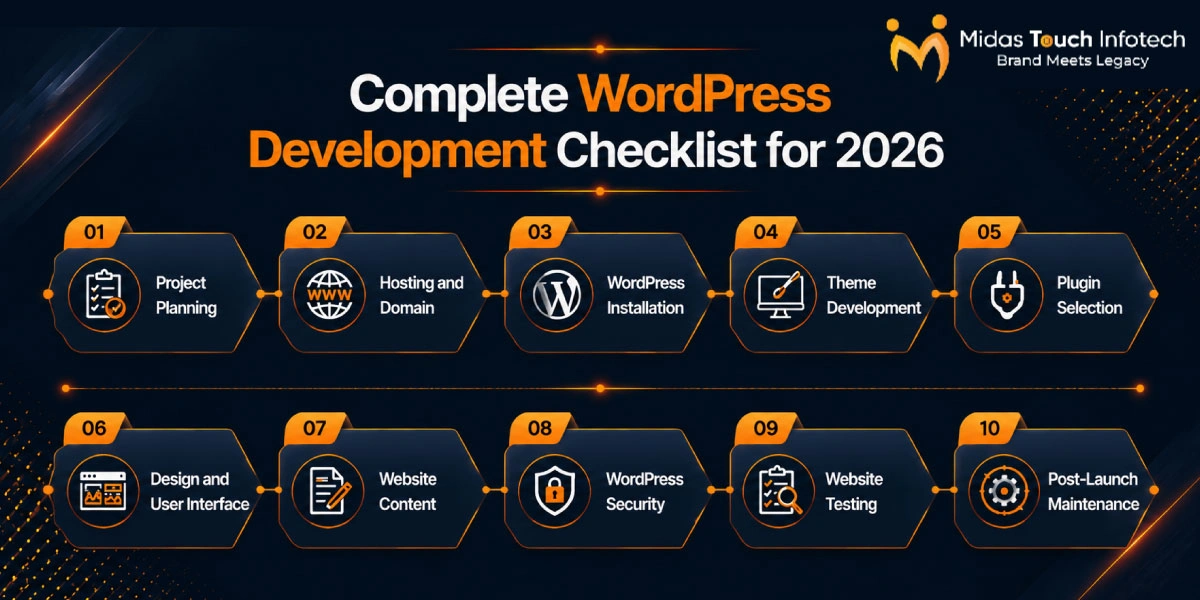
- Complete WordPress Development Checklist for 2026
- 1. Project Planning Checklist
- 2. Hosting and Domain Checklist
- 3. WordPress Installation Checklist
- 4. Theme Development Checklist
- 5. Plugin Selection Checklist
- 6. Design and UI Checklist
- 7. Content Checklist
- 8. Security Checklist
- 9. Testing Checklist
- 10. Post-Launch Maintenance Checklist
- Essential Features Every WordPress Website Should Have in 2026
- ✧ Performance Features
- ✧ Security Features
- ✧ SEO Features
- ✧ User Experience Features
- Proven WordPress Development Best Practices for Long-Term Success
- ✤ Write Clean Code
- ✤ Prioritise Performance
- ✤ Focus on Scalability
- Latest WordPress Development Trends in 2026
- ❏ AI-Powered Development
- ❏ Headless WordPress
- ❏ Block-Based Development
- ❏ Performance-First Websites
- Ready to Build a Future-Ready WordPress Website for 2026?
Complete WordPress Development Checklist for 2026
A successful WordPress website is not created by simply installing a theme and publishing pages. In 2026, a business website must be fast, secure, accessible, mobile-friendly, search-ready and flexible enough to support future growth.
WordPress contines to hold a major position in the website development market. According to W3Techs data for July 2026, WordPress is used by approximately 41.5% of all websites and represents around 59.3% of websites with a known content management system. WooCommerce also accounts for approximately 48.4% of the eCommerce systems measured in its surveys. These figures demonstrate why businesses need a disciplined development approach instead of a rushed website setup.
A structured WordPress development process helps teams define requirements, reduce errors, control costs and launch websites with fewer unexpected issues. Businesses using professional WordPress web development services India can also use a checklist to evaluate whether their development partner is covering performance, security, SEO, accessibility and ongoing maintenance, not only visual design.
This guide provides a complete WordPress development checklist for planning, building, testing, launching and maintaining a website in 2026. Whether you are developing a corporate website, blog, portfolio, membership platform or online store, it will help you establish a reliable WordPress development workflow from start to finish.
What Is WordPress Development?
🢧 Understanding WordPress Development
WordPress development is the process of creating, customising and maintaining websites using the WordPress content management system. It may involve configuring existing tools or writing custom code, depending on the project’s requirements.
The main areas of WordPress development include:
✧ Front-end development: Creating the visible layout, typography, colours, animations and responsive behaviour.
✧ Back-end development: Managing databases, server-side logic, user roles, integrations and administrative functions.
✧ Theme development: Building or customising templates that control the website’s design and page structure.
✧ Plugin development: Adding specialised features that are unavailable in WordPress core or the selected theme.
✧ Custom functionality: Developing features such as calculators, booking systems, customer portals, product configurators and API integrations.
A good development team combines these areas so the final website supports business operations, marketing and long-term maintenance.
🢧 Types of WordPress Websites
WordPress can support different digital and business requirements, including:
✧ Business websites for company information, services and lead generation
✧ eCommerce stores for physical products, digital products and subscriptions
✧ Blogs for publishing educational, news or thought-leadership content
✧ Membership websites with protected content and registered user accounts
✧ Portfolio websites for consultants, agencies, designers and creative professionals
The right setup depends on traffic, content, integrations, security and future plans.
Why Following a WordPress Development Checklist Matters
A detailed WordPress website development checklist keeps developers, designers, content teams and business stakeholders aligned. It creates a shared standard for everything that must be completed before launch.
▶ Faster Development Process
Clear tasks, owners and approval stages prevent repeated work and reduce last-minute issues. Developers can complete each stage in the right order instead of moving backwards to fix missed requirements.
▶ Fewer Technical Issues
A checklist helps identify missing redirects, broken forms, plugin conflicts, incorrect permissions and mobile layout problems before users encounter them.
▶ Better Website Performance
Performance checks ensure themes, plugins, media and hosting resources are optimised for a smoother experience.
▶ Improved Security
Security should be built into the website from the installation stage. WordPress recommends keeping the core software, themes and plugins updated and selecting extensions that continue to receive active updates.
▶ Stronger SEO Foundation
Technical SEO elements such as indexation settings, title tags, heading structure, clean URLs, XML sitemaps, schema markup and internal links can be reviewed before launch.
▶ Easier Future Maintenance
Documented configurations, reusable components and clean code make future updates less risky. This is especially important for an online store managed by a WordPress ecommerce development company, where payments, products, inventory and checkout functions must continue working after updates.
Complete WordPress Development Checklist for 2026
Use the following WordPress website checklist as a practical quality-control framework throughout your project.
1. Project Planning Checklist
❖ Define the primary website goals, such as leads, sales, bookings, downloads or brand awareness.
❖ Identify target audiences and understand their questions, problems and expected actions.
❖ Prepare a sitemap covering pages, categories, landing pages and legal content.
❖ Select the technology stack, including the theme, plugins, integrations and hosting environment.
❖ Create a project timeline for design, development, content, testing and launch.
❖ Assign responsibility for approvals, content delivery and technical decisions.
Planning prevents unnecessary features from increasing cost and complexity.
Also Read : WordPress Development Cost in 2026: A Complete Pricing Guide
2. Hosting and Domain Checklist
❖ Choose reliable hosting based on expected traffic, storage, server location and technical support.
❖ Register a clear and brand-relevant domain name.
❖ Configure an SSL certificate so the entire website loads through HTTPS.
❖ Create a staging environment for safe development and testing.
❖ Confirm access to hosting, DNS, database, CDN and email settings.
❖ Check whether automated backups and server-level caching are available.
Use staging rather than making major changes directly on the live website.
3. WordPress Installation Checklist
❖ Install the latest stable WordPress version from an official source.
❖ Create and connect the database using secure credentials.
❖ Use a unique administrator username and strong password.
❖ Set the site title, tagline, language, timezone and date format.
❖ Configure permalink settings with a clean URL structure.
❖ Remove unused default themes, plugins, pages and sample content.
❖ Keep search engine visibility disabled on staging and enable it after launch.
WordPress security guidance advises downloading official releases only from WordPress.org and using secure connections when accessing the server.
4. Theme Development Checklist
❖ Choose a lightweight and actively maintained theme.
❖ Create a child theme when customising a traditional theme.
❖ Build responsive layouts for mobile, tablet and desktop screens.
❖ Use consistent templates for posts, pages, archives and search results.
❖ Follow accessibility requirements for colours, labels, forms and keyboard navigation.
❖ Test the design across major browsers and devices.
❖ Keep reusable components modular and easy to update.
Official WordPress accessibility standards expect code in its ecosystem to work towards WCAG 2.2 Level AA, including suitable text alternatives for non-text content.
5. Plugin Selection Checklist
Install only the plugins that solve a clear technical or business requirement. Typical plugin categories include:
❖ Security plugin
❖ SEO plugin
❖ Cache or performance plugin
❖ Backup plugin
❖ Form plugin
❖ Image optimisation plugin
Before installing a plugin, review its update history, support availability, compatibility, active installations and data-handling requirements.
Avoid using multiple plugins for the same purpose. Overlapping functions can create conflicts, security risks or unnecessary pressure on website performance.
6. Design and UI Checklist
❖ Maintain brand consistency across colours, fonts, icons and imagery.
❖ Create simple navigation with clear menu labels.
❖ Make every important page easy to use on mobile devices.
❖ Place calls to action where they support the visitor’s decision.
❖ Use readable content widths, spacing and heading hierarchy.
❖ Design visible hover, focus, error and success states.
❖ Keep forms short and explain what happens after submission.
❖ Avoid animations or visual effects that distract users.
A useful interface makes the next step obvious.
7. Content Checklist
❖ Create essential pages such as Home, About, Services, Contact, Privacy Policy and Terms.
❖ Set up the blog with appropriate categories, author information and templates.
❖ Compress images and write descriptive alternative text.
❖ Add internal links between related services, blogs and landing pages.
❖ Optimise titles, headings, content, URLs and metadata for search intent.
❖ Check spelling, grammar, formatting and factual accuracy.
❖ Add trust elements such as testimonials, case studies, certifications and contact information.
❖ Confirm that every page has a clear purpose and call to action.
Write for users first while giving search engines enough context to understand each page.
8. Security Checklist
❖ Enable two-factor authentication for administrator accounts.
❖ Enforce strong and unique passwords.
❖ Configure a web application firewall.
❖ Add malware scanning and login protection.
❖ Schedule automatic off-site backups.
❖ Limit user permissions according to responsibilities.
❖ Secure the admin area, database and configuration files.
❖ Remove inactive plugins and themes.
❖ Maintain activity logs for important website changes.
WordPress’s official hardening guidance highlights secure passwords, HTTPS, backups, appropriate file permissions, monitoring and protection of administrative areas as important security layers.
9. Testing Checklist
❖ Complete functional testing for buttons, forms, menus, search, login and checkout.
❖ Test layouts on mobile, tablet, laptop and desktop screen sizes.
❖ Verify compatibility across major browsers.
❖ Test loading speed and important performance metrics.
❖ Scan the website for broken links and missing images.
❖ Test form validation, error messages and confirmation emails.
❖ Check redirects, canonical tags, XML sitemaps and robots settings.
❖ Review accessibility using automated tools and manual keyboard testing.
❖ Test backup restoration instead of checking only backup creation.
❖ Ask stakeholders to complete user acceptance testing before launch.
Testing should reflect real user journeys. For an eCommerce website, complete test orders across devices, payment methods, coupons, taxes, shipping rules and emails.
10. Post-Launch Maintenance Checklist
❖ Update WordPress core after testing updates on staging.
❖ Keep installed themes and plugins updated.
❖ Monitor login attempts, malware alerts and unusual changes.
❖ Track uptime, loading speed and server resources.
❖ Run regular backups and restoration checks.
❖ Review forms, checkout functions and third-party integrations.
❖ Fix broken links and update outdated content.
❖ Review analytics, conversions and user behaviour.
❖ Renew domains, SSL certificates, licences and subscriptions before expiry.
Launch begins the website lifecycle; it does not end it.
Essential Features Every WordPress Website Should Have in 2026
✧ Performance Features
Every website should aim for fast loading, CDN support, effective caching and optimised images.
Use modern image formats where suitable, reduce unnecessary scripts and load only the assets required for each page. Performance should be monitored across different devices and internet connections.
✧ Security Features
SSL encryption, login protection, automated backups, secure permissions and continuous updates should be standard features.
Combine security tools with reliable hosting and disciplined administration.
✧ SEO Features
A modern WordPress website needs:
➔ Schema markup
➔ Mobile-first page layouts
➔ Clean URL structures
➔ Editable title tags and meta descriptions
➔ XML sitemaps
➔ Canonical tags
➔ Logical internal linking
➔ Image alternative text
➔ Proper heading hierarchy
Content templates should make these SEO elements easy to manage without requiring developer support for every change.
✧ User Experience Features
Responsive design, fast navigation, accessible interfaces, readable typography and clear feedback messages improve usability.
Users should be able to understand the website, find the required information and complete an action without unnecessary confusion.
Proven WordPress Development Best Practices for Long-Term Success
✤ Write Clean Code
Follow WordPress coding standards, use descriptive names and document important custom logic. The official standards are designed to reduce common errors, improve readability and make future modifications easier.
A professional WordPress development company in Ahmedabad should also keep code modular, separate content from functionality and remove unused code before launch.
Developers should avoid editing WordPress core files because those changes may be lost during future platform updates.
✤ Prioritise Performance
Optimise CSS, JavaScript, fonts and images. Limit plugin use, clean the database and avoid loading large code libraries for small visual effects.
Measure performance throughout development, not only after design completion.
Developers should also check whether third-party scripts, chat tools, tracking codes or external fonts are slowing down important pages.
✤ Focus on Scalability
Use a flexible architecture that can support additional pages, languages, products, users or integrations.
Build reusable templates and choose custom development when generic plugins create unnecessary limitations. Document the website setup so another developer can safely understand and maintain it.
A scalable website does not need every possible feature at launch. It needs a technical foundation that allows new features to be introduced without rebuilding the entire platform.
Also Read : Must-Have WordPress Plugins for SEO – Free & Paid Options in 2026
Latest WordPress Development Trends in 2026
❏ AI-Powered Development
AI-assisted coding is helping development teams create initial code drafts, review repetitive code and speed up technical documentation.
Businesses are also connecting WordPress with AI-supported content workflows, search features, recommendation tools and customer-service systems.
However, human review remains necessary for accuracy, security, brand consistency and regulatory compliance. AI-generated code should always be tested before being added to a production website.
❏ Headless WordPress
Headless projects use WordPress for content management while a separate front-end application displays the website.
WordPress’s REST API allows applications to exchange website data using JSON and supports the development of custom front-end experiences.
This API-first approach can improve flexibility and scalability, but it adds complexity and should be selected only when the project genuinely needs it.
Traditional WordPress development may remain more practical for smaller websites that need simple content management and lower maintenance requirements.
❏ Block-Based Development
Full Site Editing, block themes and reusable patterns are making WordPress design more component-based.
With block themes, website areas such as headers, footers and page templates can be edited through the WordPress block editor.
Teams can create controlled design systems that give editors flexibility without producing inconsistent layouts.
Reusable block patterns also make it easier to maintain consistent banners, calls to action, service sections and content layouts across multiple pages.
❏ Performance-First Websites
More projects are prioritising lightweight components, edge delivery, Core Web Vitals optimisation and modern image formats.
The goal is a genuinely faster experience across devices and network conditions—not simply a better result from an automated speed-testing tool.
Performance-first development also encourages teams to question whether every plugin, animation, tracking script and third-party integration is necessary.
Ready to Build a Future-Ready WordPress Website for 2026?
A reliable WordPress website requires more than an attractive design. It needs clear planning, secure hosting, a clean installation, responsive theme development, carefully selected plugins, optimised content, technical SEO, structured testing and ongoing maintenance.
Use this checklist to summarise your website requirements and identify the features that directly support your business goals.
Consider what visitors should do, which integrations are essential, how the website may grow and who will maintain it after launch. These decisions will help you avoid unnecessary development costs and create a more focused website.
When comparing providers, the best WordPress development company India should be able to explain its development process, security approach, performance standards, testing methods and maintenance responsibilities in practical terms.
A transparent development team will recommend what your project genuinely needs, avoid unnecessary complexity and build a website that remains manageable after launch.
Following this WordPress development checklist gives your project a stronger foundation for speed, security, SEO, accessibility and sustainable business growth in 2026 and beyond.

Mit Thakkar
Mit Thakkar, CEO of Midas Touch Infotech and a recognized LinkedIn SEO influencer, possesses extensive expertise in branding, website development, and digital marketing. He excels in transforming ideas into impactful digital strategies.