
A website migration is one of the most important yet challenging changes a business can make. Whether you are redesigning your website, changing your domain, moving to a new CMS, restructuring URLs or improving website performance, every migration can impact your search visibility if SEO factors are not handled properly. A successful migration is not just about transferring website files and content; it is about protecting years of SEO efforts, including keyword rankings, backlinks, indexed pages, organic traffic and domain authority.
According to industry research, 53% of website traffic comes from organic search, making SEO visibility a critical growth channel for businesses. Additionally, studies show that poorly planned website migrations can result in significant ranking fluctuations, traffic losses and indexing issues due to incorrect redirects, missing metadata, broken URLs, and technical SEO errors. Google also recommends following structured site migration practices, especially when changing URLs or domains, to help search engines understand website changes and maintain ranking signals.
Working with a professional seo company helps businesses manage the complete migration process strategically while reducing SEO risks. A well-planned website seo migration checklist ensures that technical SEO, content optimisation, redirects, tracking and post-launch monitoring are properly implemented. This complete website migration seo checklist covers 30 essential steps to help businesses successfully complete the seo migration process, protect organic rankings and maintain long-term search visibility.
What Is SEO Migration and Why Does It Matter?
• Understanding SEO Migration
SEO migration is the process of moving, redesigning or restructuring a website while maintaining its existing search engine visibility.
A migration can involve changes that affect how search engines crawl, understand and rank a website. Unlike a simple website update, migration usually impacts important SEO elements such as:
- Website URLs
- Page structure
- Internal links
- Content organisation
- Technical configuration
- Search engine signals
Common SEO migration scenarios include:
• Website Redesign or UI/UX Upgrade
Businesses often redesign websites to improve user experience, branding and conversions. However, changes in navigation, templates or page structures can affect SEO performance if not planned properly.
• Domain Migration
Changing from one domain to another requires careful planning because search engines need signals that authority and content have moved to the new domain.
• CMS or Platform Migration
Businesses may move between platforms such as:
- WordPress to Shopify
- Magento to Shopify
- Custom CMS to WordPress
During these migrations, URL structures, metadata and technical settings may change.
• URL Restructuring
Changing website URLs can improve website organisation, but incorrect implementation may result in lost rankings and broken links.
• HTTP to HTTPS Migration
Moving from HTTP to HTTPS improves website security but requires proper redirects and verification.
• Website Consolidation
Businesses sometimes merge multiple websites into one. This requires careful URL mapping, content evaluation and redirect planning.
Why SEO Migration Requires Strategic Planning
Search engines need time to understand major website changes. When URLs, content or technical structures change suddenly, search engines may temporarily lose important ranking signals.
Without proper planning, website migrations can cause:
- Organic traffic decline
- Keyword ranking losses
- Indexing issues
- Broken backlinks
- Duplicate content problems
- Reduced website visibility
A strong migration strategy helps preserve existing SEO value while allowing businesses to improve website performance.
Also Read: SEO for AI Overviews: How to Improve Your Brand Visibility
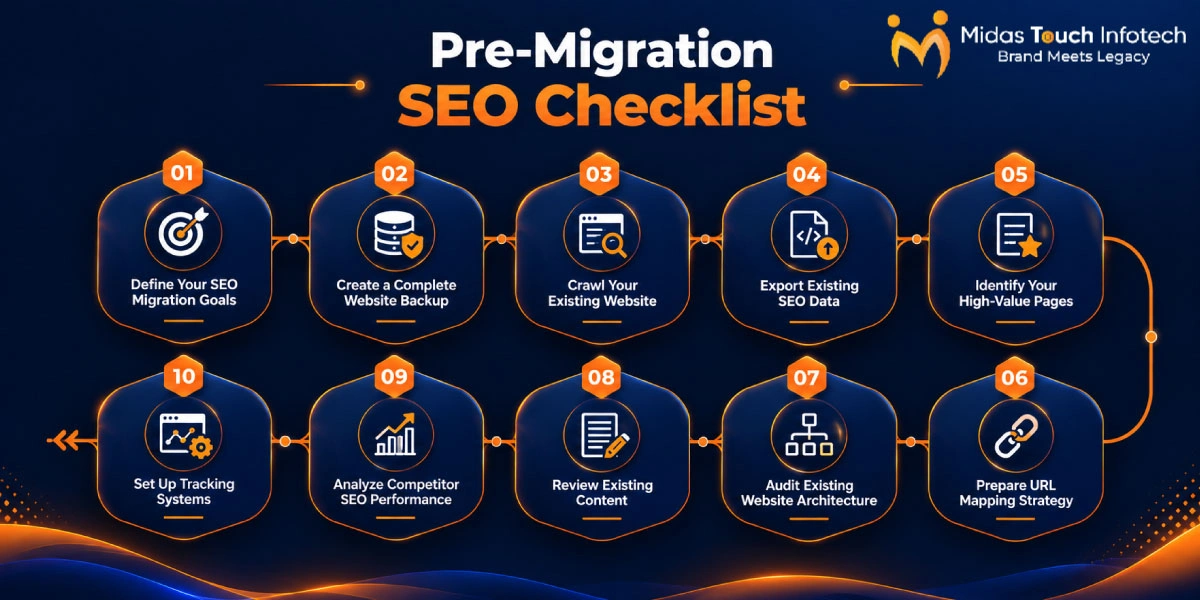
Pre-Migration SEO Checklist (Steps 1–10)
⮩ Step 1: Define Your SEO Migration Goals
Before starting the migration process, clearly define your SEO objectives and expected outcomes. Identify the reason behind the migration, such as improving website performance, redesigning the website, changing platforms, restructuring URLs or enhancing user experience. Setting clear goals helps businesses maintain important SEO factors like rankings, organic traffic, backlinks and visibility throughout the migration process.
⮩ Step 2: Create a Website Backup
Creating a complete website backup before migration protects your valuable website data and provides a recovery option if unexpected issues occur. Backup all important elements, including website files, databases, images, SEO settings, configuration files and existing redirect rules. A proper backup ensures that critical website information can be restored whenever required.
⮩ Step 3: Crawl Your Existing Website
Before making any migration changes, crawl your existing website to collect important SEO and technical information. This process helps record existing URLs, metadata, headings, internal links, status codes, canonical tags and indexing details. The crawl data works as a reference point to compare the old and new website performance after migration.
⮩ Step 4: Export SEO Data
Exporting existing SEO data helps you measure the impact of migration after launch. Save important performance information, including organic traffic, keyword rankings, backlinks, indexed pages and conversion data. This data helps identify whether rankings are maintained or if any recovery actions are required after migration.
⮩ Step 5: Identify High-Value Pages
Identify the pages that contribute the most SEO value before migration. These may include pages with high organic traffic, strong keyword rankings, valuable backlinks and higher conversion rates. Protecting these high-value pages ensures that your website does not lose important search visibility during the migration process.
⮩ Step 6: Prepare URL Mapping
URL mapping is an essential step in the SEO migration process that connects old website URLs with their new versions. Create a detailed URL mapping document that includes existing URLs, new URLs and required redirects. Proper URL mapping helps search engines understand website changes and transfers SEO authority from old pages to new pages.
⮩ Step 7: Audit Website Structure
Review your existing website structure before migration to identify potential SEO improvements and prevent technical issues. Analyse website navigation, URL hierarchy, internal linking structure, category pages and important landing pages. A well-organised website structure helps search engines crawl pages efficiently and improves user experience after migration.
⮩ Step 8: Review Existing Content
Evaluate all existing website content before migration to decide what should be migrated, updated, merged or removed. Analyse high-performing pages, outdated content, duplicate pages and content gaps. Preserving valuable content and improving weak pages helps maintain rankings and supports better SEO performance after migration.
⮩ Step 9: Analyze Competitor SEO
Competitor analysis helps identify opportunities and improve your migration strategy. Review competitors’ keyword rankings, content strategies, backlink profiles and website structures. This research provides insights into industry trends and helps businesses create a stronger SEO strategy for the migrated website.
⮩ Step 10: Set Up Tracking Tools
Before migration, configure essential tracking tools to monitor website performance before and after launch. Set up Google Search Console, Google Analytics, keyword rank tracking tools and conversion tracking. These tools help identify traffic changes, indexing problems and ranking fluctuations after the migration process.
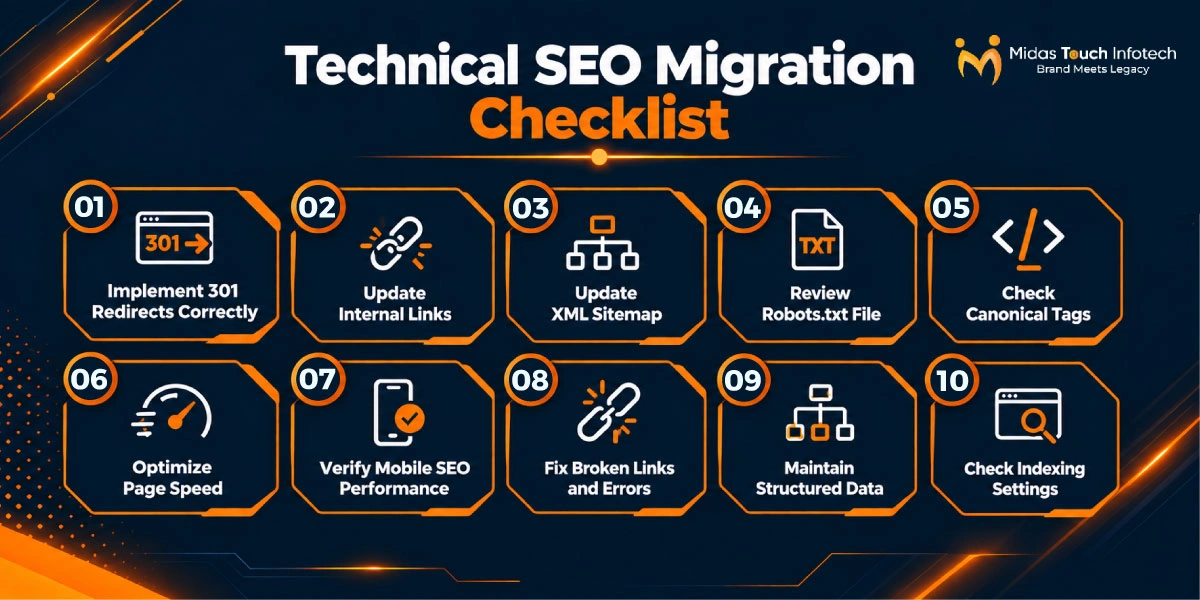
Technical SEO Migration Checklist (Steps 11–20)
🢥 Step 11: Implement 301 Redirects
Implementing 301 redirects ensures that old website URLs correctly point to relevant new pages. Redirects help transfer existing SEO authority, preserve rankings and prevent users from landing on broken pages. Make sure redirects are correctly mapped and avoid redirect chains or irrelevant redirects.
🢥 Step 12: Update Internal Links
Update all internal links after migration to ensure they point to the correct new URLs. Review navigation menus, blog links, service pages, category pages and footer links. Proper internal linking helps search engines crawl the new website structure and maintains authority flow between important pages.
🢥 Step 13: Update XML Sitemap
Create an updated XML sitemap that includes only valid and active website URLs after migration. Remove outdated URLs and submit the new sitemap to search engines. A properly updated sitemap helps search engines discover and index migrated pages more efficiently.
🢥 Step 14: Review Robots.txt
Review your robots.txt file to ensure search engines can properly crawl important website pages. Check that valuable content, CSS, JavaScript files and essential resources are not accidentally blocked. Incorrect robots.txt settings can prevent search engines from accessing and indexing important pages.
🢥 Step 15: Check Canonical Tags
Verify that canonical tags are correctly implemented after migration. Ensure that canonical URLs point to the preferred version of each page and prevent duplicate content issues. Proper canonical implementation helps search engines understand page relationships and maintain ranking signals.
🢥 Step 16: Improve Page Speed
Migration provides an opportunity to improve website performance and loading speed. Optimise images, reduce unnecessary scripts, improve server response time and resolve Core Web Vitals issues. Faster websites provide better user experience and can support improved search performance.
🢥 Step 17: Verify Mobile SEO
Check mobile usability and responsiveness after migration to ensure a smooth experience across devices. Review mobile navigation, page loading speed, content visibility and responsive design. Since search engines prioritise mobile-first indexing, maintaining mobile SEO performance is essential.
🢥 Step 18: Fix Broken Links
Identify and resolve broken links, missing pages and 404 errors after migration. Check internal links, external references and redirected pages to ensure users and search engines can access important content without issues. Fixing broken links improves website usability and crawlability.
🢥 Step 19: Maintain Schema Markup
Review and maintain structured data implementation after migration. Ensure schema markup for organisation, services, products, reviews and FAQs remains accurate and functional. Proper schema helps search engines better understand website content and improves search appearance opportunities.
🢥 Step 20: Check Indexing Settings
Review indexing settings to ensure important pages remain accessible to search engines. Check no index tags, robots directives, sitemap coverage and indexed pages. Incorrect indexing settings can prevent valuable pages from appearing in search results and negatively impact organic visibility.

Content & On-Page SEO Migration Checklist (Steps 21–25)
⮩ Step 21: Preserve Metadata
Maintain important on-page SEO elements during migration, including title tags, meta descriptions, headings and image alt text. Preserving metadata helps search engines understand page relevance and protects existing keyword rankings.
⮩ Step 22: Maintain Keyword Targeting
Ensure that existing keyword strategies are preserved during migration. Review target keywords, search intent and content optimisation to avoid losing ranking opportunities. Maintaining keyword alignment helps migrated pages continue performing well in search results.
⮩ Step 23: Preserve Internal Linking
Maintain the existing internal linking structure to preserve SEO authority distribution across the website. Review links between service pages, blogs, category pages and important landing pages. Strong internal linking improves crawling and supports better rankings.
⮩ Step 24: Optimize Content Structure
Improve content structure during migration by organising information with clear headings, short paragraphs, bullet points and FAQs. A well-structured content format improves readability, user experience and helps search engines better understand page information.
⮩ Step 25: Review Image SEO
Optimise images during migration by checking image file sizes, formats, filenames and alt text. Proper image optimisation improves page speed, accessibility and overall website performance.
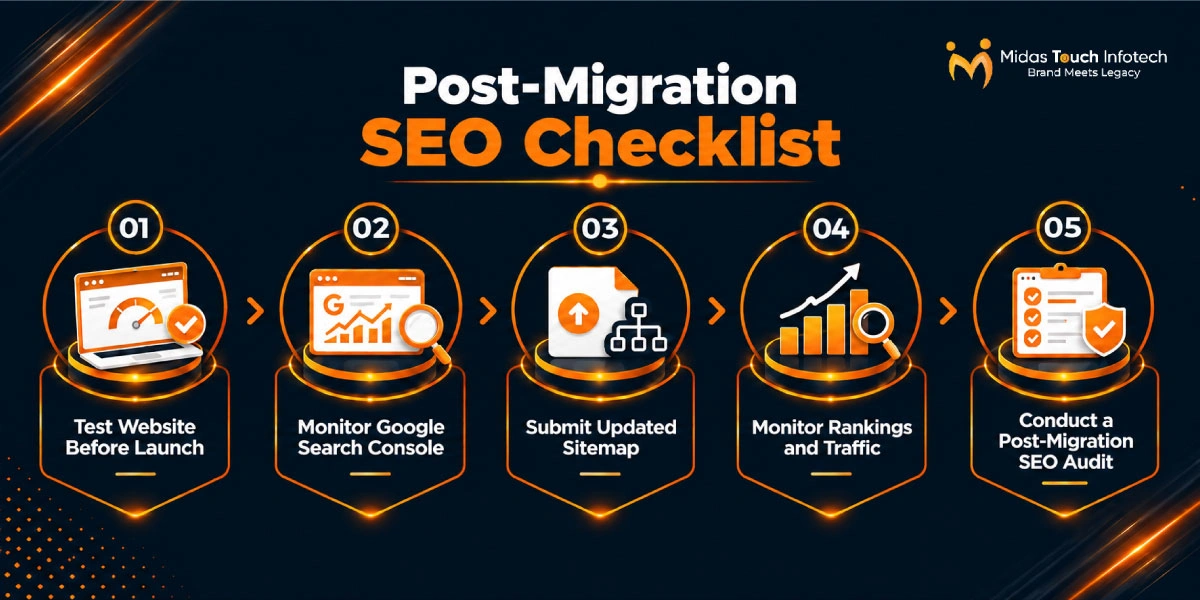
Post-Migration SEO Checklist (Steps 26–30)
🢥 Step 26: Test Website Before Launch
Before launching the migrated website, perform complete testing to identify potential issues. Check redirects, crawling, page speed, forms, internal links and mobile usability. Proper testing ensures a smooth transition without affecting user experience or SEO performance.
🢥 Step 27: Monitor Search Console
After migration, monitor Google Search Console regularly to identify indexing errors, crawl issues and ranking changes. Tracking search performance helps businesses quickly detect problems and take corrective actions.
🢥 Step 28: Submit Updated Sitemap
Submit the updated XML sitemap after migration to help search engines discover new website URLs. This allows search engines to crawl and index the migrated pages more efficiently.
🢥 Step 29: Monitor Rankings & Traffic
Track keyword rankings, organic traffic, conversions and indexed pages after migration. Comparing pre- and post-migration performance helps identify SEO improvements and areas requiring further optimisation.
🢥 Step 30: Conduct SEO Audit
Perform a complete SEO audit after migration to review technical performance, content quality, redirects, indexing and website health. A detailed audit helps identify remaining issues and ensures long-term organic growth after migration.
Also Read: SEO Cost in India for Small, Mid-Sized & Enterprise Businesses
How Long Does It Take to Recover SEO After Migration?
- SEO recovery after a website migration depends on several factors, including website size, migration complexity, technical implementation and the overall quality of the migration process. Small websites with fewer pages and simple URL structures may stabilise within a few weeks, while larger websites with thousands of pages, complex structures and multiple redirects may require several months to fully recover their organic visibility.
- The recovery timeline is also influenced by factors such as migration quality, the number of URLs changed, redirect accuracy, website authority and search engine crawling frequency. Proper implementation of 301 redirects, preservation of SEO elements, accurate indexing settings and maintaining content relevance can significantly reduce ranking fluctuations after migration.
- Working with experienced seo services consultants can help businesses identify migration-related issues quickly, monitor performance changes and implement recovery strategies effectively. A professional SEO team ensures that technical problems, lost rankings and traffic drops are addressed promptly while helping the website regain stable search visibility.

Ready for a Risk-Free SEO Migration? Let’s Safeguard Your Search Visibility
Website migration is not just a technical transition; it is a strategic SEO process that protects your online growth.
A properly planned seo migration checklist helps businesses maintain rankings, preserve backlinks and avoid unnecessary traffic losses.
Partnering with experts offering professional seo services ensures that every stage of migration is managed carefully, from planning and redirects to testing and monitoring.
Whether you are redesigning your website, changing platforms or restructuring your online presence, working with a professional seo consultant can help you complete the migration smoothly.
Choose a trusted professional seo service partner to protect your rankings, maintain organic visibility and support long-term digital growth.
With the right strategy, businesses can successfully complete website migrations while keeping their search performance strong.

Mit Thakkar
Mit Thakkar, CEO of Midas Touch Infotech and a recognized LinkedIn SEO influencer, possesses extensive expertise in branding, website development, and digital marketing. He excels in transforming ideas into impactful digital strategies.