
Summarize this blog post with:


- Technical SEO Checklist Every Business Leader Should Review
- Why Technical SEO Matters for Business Growth
- ✦ It Impacts Search Visibility
- ✦ It Improves User Experience
- ✦ It Supports Better ROI from SEO Efforts
- Website Crawlability Checklist
- ➥ Check Robots.txt File
- ➥ Review XML Sitemap
- ➥ Fix Crawl Errors
- Indexing Checklist
- ☸ Review Indexed Pages
- ☸ Use No index Tags Carefully
- ☸ Monitor Google Search Console
- Website Speed and Core Web Vitals Checklist
- ➔ Improve Page Loading Speed
- ➔ Check Core Web Vitals
- ➔ Reduce Heavy Website Elements
- Mobile SEO Checklist
- ❖ Ensure Mobile-Friendly Design
- ❖ Test Mobile Page Speed
- ❖ Avoid Mobile Usability Issues
- Website Architecture Checklist
- ❏ Maintain Clear URL Structure
- ❏ Improve Internal Linking
- ❏ Use Proper Navigation
- On-Page Technical SEO Checklist
- ➥ Review Meta Tags
- ➥ Use Proper Heading Structure
- ➥ Optimise Images
- Structured Data Checklist
- ➢ Add Schema Markup
- ➢ Validate Structured Data
- Security and Website Health Checklist
- ☸ Use HTTPS
- ☸ Fix Broken Links
- ☸ Review Redirect Chains
- Duplicate Content Checklist
- ▶ Use Canonical Tags
- ▶ Avoid Duplicate Service Pages
- ▶ Review Parameter URLs
- Technical SEO Audit Checklist for Business Leaders
- Reports Business Leaders Should Review
- How Often Should Businesses Review Technical SEO?
- 1. Monthly Review
- 2. Quarterly Review
- 3. After Major Website Changes
- Ready to Strengthen Your Website’s Technical SEO?
Technical SEO Checklist Every Business Leader Should Review
Technical SEO is often seen as a developer’s responsibility, but in reality, it directly affects business performance. A website may have strong content, attractive design, good branding, and active marketing campaigns, but if search engines cannot crawl, index, and understand the website properly, the business may lose valuable search visibility, leads, and revenue opportunities.
In today’s digital-first market, technical SEO is no longer only about fixing backend issues. It is about improving website performance, user experience, search accessibility, page speed, mobile usability, security, and overall website health. These elements directly influence how users interact with a website and how search engines evaluate it.
According to Google’s mobile page speed research, as page load time increases from one second to ten seconds, the probability of a mobile visitor bouncing increases by 123%. The same research also found that when the number of page elements increases from 400 to 6,000, the probability of conversion drops by 95%. This clearly shows that technical issues are not just technical problems; they are business problems.
For companies investing in professional seo services india, technical SEO should be reviewed regularly by leadership teams, not only by SEO executives or developers. Business leaders do not need to manage every technical detail, but they should understand the key areas that impact search rankings, website performance, user trust, and conversions.
This technical seo checklist is designed to help business leaders understand what should be reviewed, why it matters, and how technical SEO supports long-term business growth.
Why Technical SEO Matters for Business Growth
Technical SEO creates the foundation for every other SEO activity. Content marketing, keyword optimisation, backlinks, and digital PR can perform better when the website is technically strong. If the technical base is weak, even high-quality content may struggle to rank.
A technically healthy website helps search engines crawl pages efficiently, understand page structure, index the right content, and serve users with a smooth experience. For business leaders, this means better visibility, stronger engagement, and higher chances of conversion.
✦ It Impacts Search Visibility
Search visibility depends on whether search engines can access and understand your important pages. If Google cannot crawl or index your key service pages, product pages, category pages, or landing pages, those pages may not appear in search results.
Technical SEO helps ensure that important pages are not blocked by robots.txt, noindex tags, incorrect canonical tags, redirect issues, or broken links. It also helps search engines discover new and updated content through sitemaps and internal linking.
For example, if a business launches a new service page but the page is not included in the sitemap or is accidentally marked noindex, it may not generate any organic traffic. This can result in missed leads and wasted content investment.
✦ It Improves User Experience
Technical SEO also improves how users experience your website. A slow, confusing, or poorly structured website can frustrate visitors and increase bounce rates.
Fast-loading pages help users quickly access the information they need. Mobile-friendly design helps visitors browse smoothly on smartphones. Clear navigation helps users find service pages, pricing details, contact forms, and resources without difficulty.
When users enjoy a smooth website experience, they are more likely to stay longer, explore more pages, and take action. This can improve engagement, lead generation, and conversion rates.
✦ It Supports Better ROI from SEO Efforts
SEO requires investment in content, strategy, tools, development, design, and ongoing optimisation. But if the website has unresolved technical issues, that investment may not deliver its full value.
Content and backlinks perform better when the website is easy to crawl, fast to load, secure, mobile-friendly, and properly structured. Technical SEO prevents hidden problems from reducing SEO performance.
This is why companies working with seo consulting services india should include technical audits as part of their SEO strategy. A regular technical review ensures that the SEO budget is not wasted because of avoidable website issues.
Website Crawlability Checklist
Crawlability refers to how easily search engine bots can access and move through your website. If important pages cannot be crawled, they may not be indexed or ranked. Crawlability is one of the first areas every business should review in a technical seo audit checklist.
➥ Check Robots.txt File
The robots.txt file tells search engine crawlers which parts of the website they can or cannot access. It is useful for blocking unnecessary admin pages, staging areas, internal search pages, duplicate pages, or low-value sections.
However, robots.txt must be used carefully. If important service pages, product pages, blog categories, or resource pages are blocked, search engines may not crawl them.
Business leaders should ask their SEO team to review whether any valuable pages are blocked accidentally. The robots.txt file should allow search engines to access important pages while preventing crawlers from wasting time on unnecessary sections.
➥ Review XML Sitemap
An XML sitemap helps search engines discover important URLs on your website. It should include only live, indexable, and valuable URLs.
A clean sitemap should not include broken pages, redirected URLs, duplicate URLs, noindex pages, staging URLs, or low-value pages. If the sitemap is outdated or cluttered, search engines may receive confusing signals about which pages matter.
For business leaders, a sitemap review is important because it shows whether the website is presenting the right pages to search engines. Service pages, product pages, important blogs, and key landing pages should be included properly.
➥ Fix Crawl Errors
Crawl errors prevent search engines from accessing website pages. These may include 404 errors, server errors, redirect issues, blocked resources, or DNS problems.
A 404 error means the page cannot be found. Server errors may indicate website hosting or backend issues. Redirect problems may confuse both users and search engines.
Crawl errors should be reviewed regularly through Google Search Console and SEO crawling tools. Old URLs should be redirected properly, broken links should be updated, and server issues should be resolved quickly.

Indexing Checklist
Indexing is the process through which search engines store and show pages in search results. A page can only rank if it is indexed. This makes indexing one of the most important parts of any seo technical audit checklist.
☸ Review Indexed Pages
Business leaders should regularly check whether important pages are indexed. These may include homepage, service pages, product pages, location pages, industry pages, blog posts, case studies, and contact pages.
At the same time, unnecessary pages should not be indexed. These may include thank-you pages, test pages, duplicate pages, internal search result pages, tag pages, private pages, or thin content pages.
A healthy indexing setup ensures that search engines focus on valuable pages instead of wasting attention on low-quality or irrelevant URLs.
☸ Use No index Tags Carefully
A no index tag tells search engines not to show a page in search results. It is useful for thin, duplicate, private, or low-value pages.
However, noindex tags can create serious SEO problems if applied incorrectly. If an important service page or product page is accidentally marked noindex, it may disappear from search results.
Business leaders should ask their SEO team to review noindex usage during every major website update. This is especially important after redesigns, migrations, theme updates, or CMS changes.
☸ Monitor Google Search Console
Google Search Console is one of the most important tools for monitoring indexing performance. It helps identify pages that are indexed, not indexed, crawled but not indexed, discovered but not indexed, blocked, redirected, or affected by errors.
Business leaders do not need to review every technical detail daily, but they should ask for monthly Search Console summaries. This helps identify hidden problems before they affect organic traffic and lead generation.
Also Read : Advanced Link Building Types for Sustainable SEO Results
Website Speed and Core Web Vitals Checklist
Website speed is one of the most visible technical SEO factors because it directly affects user experience. Slow websites can reduce engagement, increase bounce rates, and lower conversion opportunities.
In 2026, speed and Core Web Vitals should be a key part of the technical seo checklist 2026 for every business website.
➔ Improve Page Loading Speed
Page loading speed depends on multiple factors, including image size, server response time, code quality, caching, plugins, scripts, fonts, and third-party tools.
Businesses should compress large images, minify CSS and JavaScript, enable browser caching, use a CDN where required, and remove unnecessary scripts. Hosting quality should also be reviewed, especially for websites with high traffic or large media files.
A fast website creates a better first impression and helps users reach important information quickly. This is especially important for lead generation websites, ecommerce stores, SaaS websites, and service businesses.
➔ Check Core Web Vitals
Core Web Vitals are performance metrics that measure real user experience. The three main metrics business leaders should understand are:
∘ Largest Contentful Paint, which measures loading performance.
∘ Interaction to Next Paint, which measures responsiveness.
∘ Cumulative Layout Shift, which measures visual stability.
A website with poor Core Web Vitals may feel slow, unstable, or difficult to use. This can affect user trust and engagement.
Business leaders should ask for regular Core Web Vitals reports, especially for key pages like homepage, service pages, product pages, and high-traffic blog posts.
➔ Reduce Heavy Website Elements
Many websites become slow because of heavy design elements. Large sliders, background videos, unnecessary animations, multiple plugins, unused scripts, and oversized images can affect performance.
Modern websites should balance design with speed. Visual appeal is important, but not at the cost of usability and conversions.
Businesses should review whether every plugin, animation, slider, and script is necessary. Removing unused elements can improve speed and reduce technical complexity.
Mobile SEO Checklist
Mobile SEO is critical because many users search, browse, compare, and contact businesses through smartphones. A website that works well on desktop but performs poorly on mobile can lose valuable traffic and leads.
For businesses reviewing a technical seo checklist for websites, mobile performance should be treated as a priority.
❖ Ensure Mobile-Friendly Design
A mobile-friendly website should adjust properly to different screen sizes. Text should be easy to read, buttons should be easy to tap, images should scale correctly, and forms should be simple to complete.
Responsive design helps users browse smoothly without zooming, scrolling awkwardly, or struggling with navigation.
Business leaders should personally check important pages on mobile devices. This gives a practical understanding of how customers experience the website.
❖ Test Mobile Page Speed
Mobile page speed should be reviewed separately from desktop speed. Many websites perform well on desktop but load slowly on mobile because of heavy images, scripts, fonts, or server delays.
Since mobile users often have less patience and may browse on different network speeds, mobile performance directly affects conversions.
Businesses working with professional seo india providers should ensure that mobile speed is included in SEO reporting, not treated as a separate development issue.
❖ Avoid Mobile Usability Issues
Mobile usability issues can damage both user experience and SEO performance. Common problems include overlapping content, text that is too small, buttons placed too close together, intrusive popups, broken layouts, and confusing menus.
Mobile navigation should be simple and direct. Users should be able to find services, contact details, pricing information, and enquiry forms without difficulty.
A clean mobile experience helps improve engagement and encourages users to take action.
Website Architecture Checklist
Website architecture refers to how pages are organised and connected. A clear structure helps users and search engines understand the relationship between different pages.
Strong website architecture is especially important for businesses with multiple services, locations, industries, blogs, and landing pages.
❏ Maintain Clear URL Structure
URLs should be short, readable, and SEO-friendly. A clear URL helps users understand the page topic before they click.
For example, a service page URL should clearly describe the service instead of using random numbers or unclear parameters. Clean URLs also make reporting, sharing, and internal linking easier.
Businesses should avoid overly long URLs, unnecessary dates, duplicate URL versions, and confusing folder structures.
❏ Improve Internal Linking
Internal linking connects important pages within the website. It helps search engines discover pages and understand which pages are most important.
Service pages should be linked from the homepage, navigation menu, relevant blogs, and related service pages. Blogs should connect to relevant service pages to support lead generation.
Orphan pages, which are pages with no internal links, should be avoided because search engines and users may struggle to find them.
❏ Use Proper Navigation
Website navigation should be simple, logical, and user-friendly. Important pages should not be hidden too deep inside the website.
Menus should clearly show key services, industries, solutions, resources, about page, and contact page. For large websites, dropdown menus and footer navigation can help organise content better.
Good navigation improves user experience and helps search engines understand page hierarchy.
On-Page Technical SEO Checklist
On-page technical SEO focuses on elements that help search engines understand page content and help users quickly identify relevance.
➥ Review Meta Tags
Every important page should have a unique title tag and meta description. The title tag helps search engines and users understand the main topic of the page. The meta description encourages users to click from search results.
Duplicate metadata should be avoided because it can confuse search engines and reduce click-through rates.
A strong meta title should include the main keyword naturally, while the meta description should explain the value of the page clearly.
➥ Use Proper Heading Structure
Heading structure helps organise content. Every page should have one clear H1 tag that represents the main topic. H2 and H3 tags should be used to divide the content into useful sections.
Proper headings improve readability and help search engines understand content hierarchy.
Business leaders should ensure that key pages do not have missing H1 tags, multiple unnecessary H1 tags, or headings used only for design purposes.
➥ Optimise Images
Images should be compressed, named properly, and supported with descriptive alt text. Large image files can slow down the website, while missing alt text can reduce accessibility and SEO value.
Image file names should be relevant instead of generic names like image123.jpg. For example, a service-related image should include a descriptive file name that matches the page topic.
Optimised images improve page speed, accessibility, and search relevance.
Structured Data Checklist
Structured data helps search engines better understand website content. It can also support enhanced search results where applicable.
➢ Add Schema Markup
Schema markup can be used for different page types. Common schema types include organisation schema, local business schema, FAQ schema, product schema, service schema, article schema, breadcrumb schema, and review schema.
For service businesses, schema can help search engines understand business details, services, location, FAQs, and page structure.
Schema should be implemented carefully and only where relevant. It should match visible page content and should not be used in a misleading way.
➢ Validate Structured Data
After adding schema, it should be tested for errors and warnings. Incorrect or incomplete schema can reduce effectiveness.
Businesses should ask their SEO team to validate structured data regularly, especially after website redesigns, plugin updates, theme changes, or new page launches.
Schema should remain accurate, updated, and aligned with the actual content shown on the page.
Security and Website Health Checklist
Website security and health are important for user trust and technical performance. Search engines and users both prefer websites that are secure, reliable, and easy to navigate.
☸ Use HTTPS
Every business website should use HTTPS. SSL certificates protect data between the user and the website.
If a website still has HTTP pages, they should be redirected to HTTPS. Mixed content issues should also be fixed. Mixed content happens when a secure page loads insecure resources such as images, scripts, or stylesheets from HTTP URLs.
A secure website improves trust and avoids browser warnings that may discourage visitors.
☸ Fix Broken Links
Broken links create a poor user experience and waste crawl resources. They may occur when pages are deleted, URLs are changed, or external resources are removed.
Internal broken links should be fixed by updating the destination URL or redirecting old pages properly. External broken links should be replaced with active and relevant sources.
Regular broken link checks help maintain a clean user journey.
☸ Review Redirect Chains
Redirects are useful when URLs change, but too many redirects can slow down page loading and confuse crawlers.
A redirect chain happens when one URL redirects to another, which then redirects to another. This should be avoided where possible.
Businesses should use direct 301 redirects from old URLs to the final destination. Redirects should be clean, simple, and regularly reviewed.
For large websites, an enterprise seo consultant india can help manage redirect rules, migration planning, and large-scale technical SEO issues.
Duplicate Content Checklist
Duplicate content can confuse search engines and weaken page authority. It may happen because of URL variations, copied service pages, parameter URLs, printer-friendly pages, category pages, or similar location pages.
▶ Use Canonical Tags
Canonical tags tell search engines which version of a page should be treated as the main version. This is useful when similar or duplicate content exists across multiple URLs.
For example, product filter pages, tracking URLs, or duplicate category pages may need canonical tags to avoid confusion.
Incorrect canonical tags can create indexing problems, so they should be reviewed carefully during technical audits.
▶ Avoid Duplicate Service Pages
Many businesses create multiple service, city, or industry pages using nearly the same content. This can reduce content quality and make pages less useful for users.
Location pages and industry pages should have unique content, specific examples, relevant FAQs, and clear value for the target audience.
Copying the same content across multiple pages should be avoided. Every page should have a clear purpose.
▶ Review Parameter URLs
Parameter URLs are often created by filters, tracking codes, sorting options, session IDs, or search functions. If not managed properly, they can create thousands of unnecessary URLs.
These URLs may waste crawl budget and create duplicate content problems.
Businesses should work with SEO and development teams to manage parameter URLs through canonical tags, noindex rules, robots.txt, or platform-level controls where appropriate.
Technical SEO Audit Checklist for Business Leaders
Reports Business Leaders Should Review
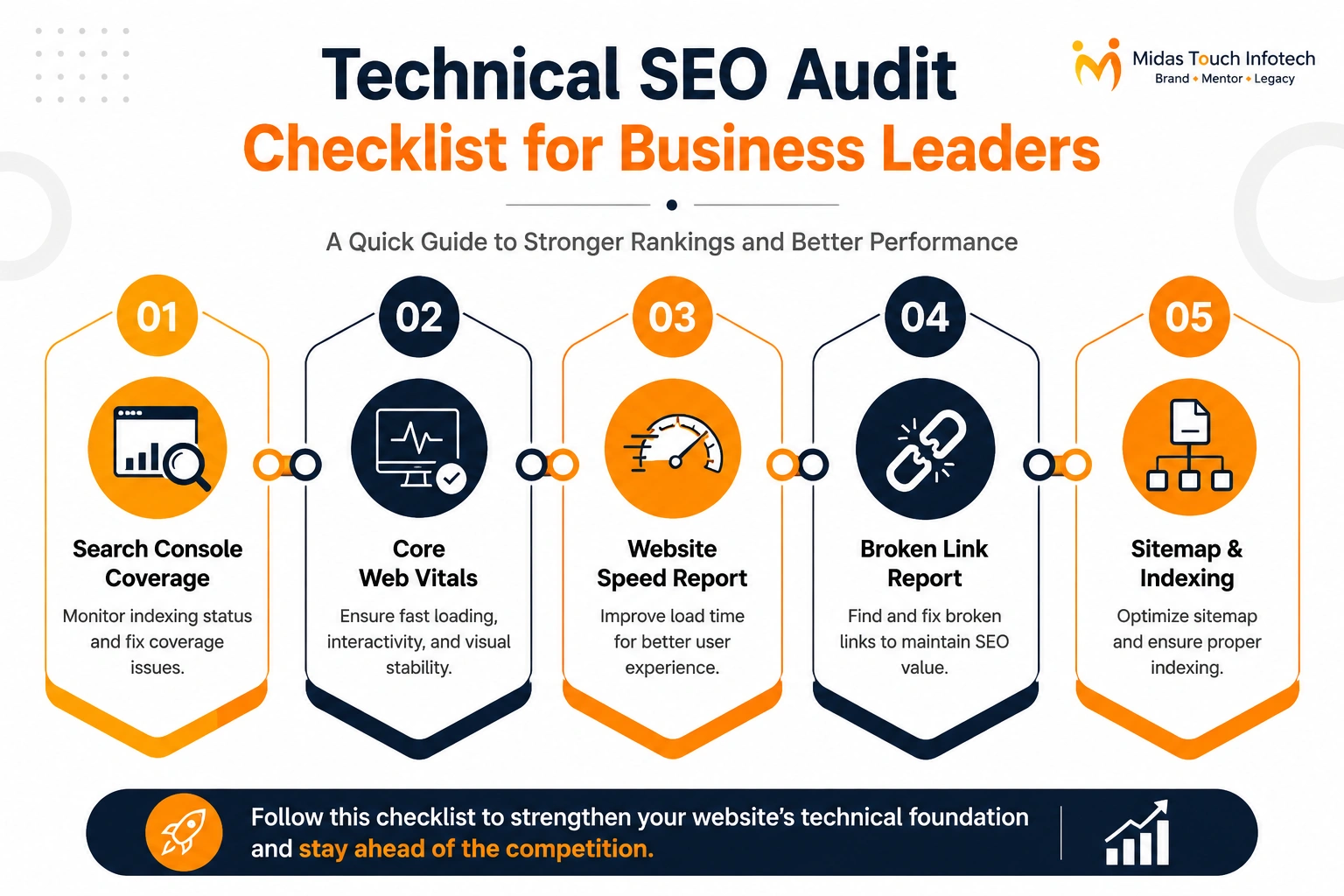
✧ Business leaders should review simplified monthly reports that highlight the most important technical SEO areas.
✧ Useful reports include Google Search Console coverage report, Core Web Vitals report, website speed report, broken link report, sitemap report, indexing report, crawl error report, and technical audit summary.
✧ The report should not only show problems; it should also explain business impact. For example, instead of saying “12 pages have 404 errors,” the report should mention whether those pages were receiving traffic, backlinks, or leads.
✧ Companies working with seo services consultants should ask for clear, decision-focused reporting that connects technical SEO issues with business priorities.
Also Read : Best SEO Agency in Manchester: How to Choose the Right Partner
How Often Should Businesses Review Technical SEO?
Technical SEO is not a one-time task. Websites change regularly because of new pages, design updates, CMS changes, plugin updates, tracking scripts, content edits, and development work.
This is why businesses should review technical SEO at regular intervals.
1. Monthly Review
A monthly review should cover basic but important issues such as crawl errors, broken links, indexing issues, page speed basics, sitemap status, and Search Console warnings.
This helps detect problems early before they affect rankings or leads.
Monthly technical checks are especially useful for websites that publish frequent blogs, launch new landing pages, or run SEO campaigns.
2. Quarterly Review
A quarterly review should be more detailed. It should include a full technical SEO audit, Core Web Vitals review, website architecture review, schema validation, canonical checks, redirect review, mobile usability analysis, and duplicate content checks.
Quarterly audits help identify deeper issues that may not appear in basic monthly checks.
This is important for growing businesses, enterprise websites, ecommerce platforms, SaaS websites, and multi-location brands.
3. After Major Website Changes
Technical SEO should always be reviewed after major website changes. These changes may include website redesigns, domain migrations, CMS changes, theme updates, plugin updates, new page launches, URL changes, hosting changes, or tracking setup changes.
Many SEO problems happen during redesigns and migrations because old URLs are removed, redirects are missed, pages are accidentally noindexed, or content structure changes.
A post-launch technical SEO review can protect rankings, traffic, and conversions.

Ready to Strengthen Your Website’s Technical SEO?
Technical SEO ensures that search engines and users can access your website properly. It helps Google crawl important pages, index valuable content, understand website structure, and deliver a better experience to users.
For business leaders, technical SEO should not be ignored or treated as a small backend task. It directly affects visibility, performance, user experience, and lead generation. You do not need to manage technical SEO every day, but you should regularly review key reports and ask the right questions.
A strong technical SEO foundation helps content perform better, improves website usability, reduces hidden errors, and protects long-term SEO investment.
Whether you are running a corporate website, ecommerce platform, SaaS website, service-based website, or enterprise portal, this checklist can help you stay aware of critical technical areas.
If your website is facing indexing issues, slow speed, traffic drops, broken pages, or poor mobile performance, working with an expert seo company in india can help you identify the root causes and fix them strategically.
A technically strong website improves search visibility, creates better user experiences, and increases conversion opportunities. In 2026, technical SEO is not just a website maintenance activity; it is a business growth priority.

Mit Thakkar
Mit Thakkar, CEO of Midas Touch Infotech and a recognized LinkedIn SEO influencer, possesses extensive expertise in branding, website development, and digital marketing. He excels in transforming ideas into impactful digital strategies.