Summarize this blog post with:


- A Complete Guide to Web Design Best Practices for 2026
- Why Web Design Best Practices Matter in 2026
- ↠ Stronger First Impressions
- ↠ Better User Experience
- ↠ Higher Conversion Potential
- ↠ Improved Search Visibility
- Essential Web Design Best Practices for 2026
- 1. Design With a Mobile-First Approach
- 2. Keep Website Navigation Simple
- 3. Prioritise Website Speed and Performance
- 4. Create a Clear Visual Hierarchy
- 5. Maintain Consistent Branding
- 6. Use Readable and Accessible Typography
- 7. Make Accessibility a Design Priority
- 8. Use White Space Strategically
- 9. Design Clear and Action-Oriented CTAs
- 10. Optimise Forms for Better Conversions
- 11. Build Trust Through Website Design
- 12. Use High-Quality Visual Content
- UX Best Practices Every Website Should Follow
- ◈ Understand User Intent
- ◈ Reduce User Friction
- ◈ Provide Clear User Feedback
- ◈ Maintain Design Consistency
- SEO-Friendly Web Design Best Practices
- ✦ Create a Search-Friendly Site Architecture
- ✦ Design Content for Easy Scanning
- ✦ Optimise Images for Search and Performance
- ✦ Avoid Design Elements That Hurt SEO
- Web Design Trends Businesses Should Consider in 2026
- ✧ AI-Personalised Website Experiences
- ✧ AI-Assisted Website Interactions
- ✧ Interactive Micro-Experiences
- ✧ Minimal and Content-Focused Interfaces
- ✧ More Inclusive and Accessible Design
- Common Web Design Mistakes to Avoid in 2026
- ➔ Overcomplicated Navigation
- ➔ Ignoring Mobile Users
- ➔ Sacrificing Speed for Visual Effects
- ➔ Weak CTA Placement
- ➔ Inconsistent Design
- ➔ Ignoring Accessibility
- How Businesses Can Evaluate Their Current Website Design
- ➥ Review Website Performance
- ➥ Analyse User Behaviour
- ➥ Conduct Mobile and Accessibility Testing
- ➥ Review Conversion Performance
- When Should You Consider a Website Redesign?
- Ready to Improve Your Website for Better Business Results?
A Complete Guide to Web Design Best Practices for 2026
Website design is no longer simply about creating attractive pages. Design standards continue to evolve as users expect websites to be faster, easier to navigate, accessible across devices and capable of providing relevant information without unnecessary friction. Technologies such as AI-powered personalisation, responsive interfaces and interactive experiences are also changing how businesses approach website design.
Accessibility is particularly important. According to the WebAIM Million 2026 report, which analysed the home pages of one million websites, 95.9% had detectable WCAG 2 accessibility failures. The report also found low-contrast text on 83.9% of home pages, demonstrating that even fundamental design issues remain common.
For businesses, these expectations make regular website reviews increasingly important. A website that looked modern several years ago may now suffer from poor mobile usability, slow performance, accessibility problems or confusing navigation. Investing in the best web design services can help businesses address these issues while creating an experience that supports customers and commercial objectives.
This guide explains the most important web design best practices 2026 businesses should consider, covering responsive design, performance, accessibility, UX, SEO, conversion optimisation and emerging design trends.

Why Web Design Best Practices Matter in 2026
Following recognised web design best practices helps businesses create websites that are useful for visitors while supporting marketing and conversion goals.
↠ Stronger First Impressions
Visitors often form an opinion about a business soon after arriving on its website. Poor layouts, inconsistent branding or outdated design can immediately reduce confidence.
A clean, professional interface creates a stronger first impression. Consistent branding, organised content and clear messaging can communicate credibility before a visitor even contacts the business.
↠ Better User Experience
Visitors usually arrive with a specific objective, such as comparing services, researching a solution, checking pricing or making an enquiry.
Good website design makes these tasks easier. Clear navigation, logical page structures and readable content reduce the effort required to find information. Businesses that remove unnecessary friction can provide a smoother customer journey across both desktop and mobile devices.
↠ Higher Conversion Potential
A good-looking website does not automatically generate conversions. Design should guide users towards meaningful actions such as requesting a quotation, booking a consultation, purchasing a product or contacting the company.
Strategically positioned calls to action, simplified forms and clear information hierarchy can help users make decisions without unnecessary distractions.
↠ Improved Search Visibility
Design decisions can also influence SEO. Mobile usability, website speed, navigation, content structure and accessibility all contribute to the overall website experience.
Experienced web design firms therefore need to consider both visual appearance and search performance. A website should make content straightforward for users to consume while allowing search engines to understand and crawl important pages efficiently.
Essential Web Design Best Practices for 2026
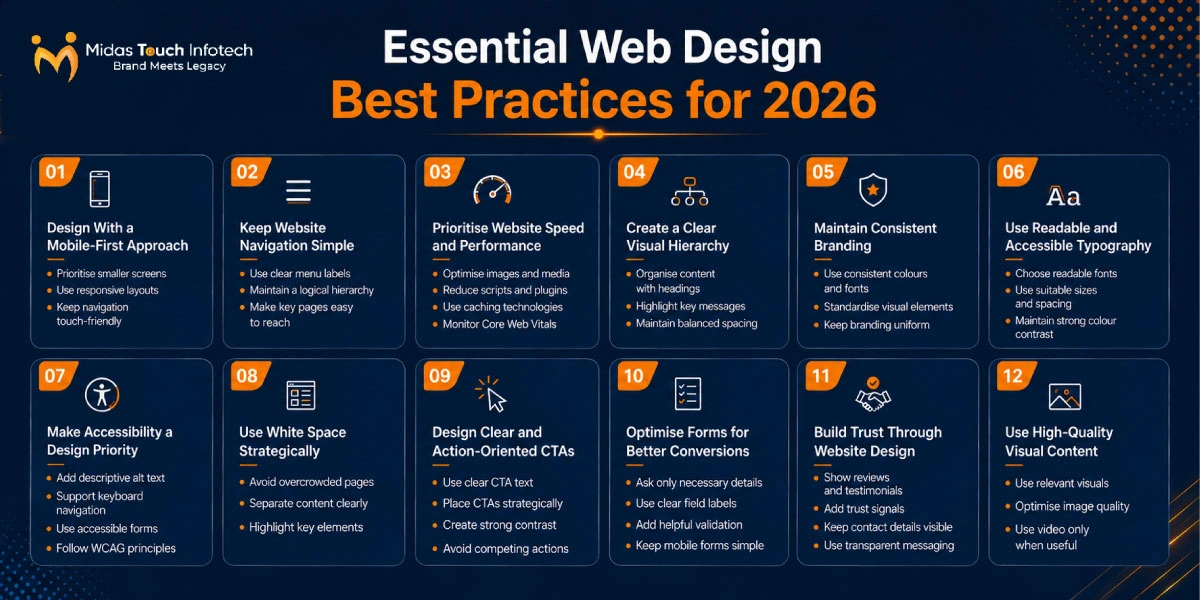
The following best web design practices can help businesses create websites that remain usable, scalable and competitive.
1. Design With a Mobile-First Approach
Mobile-first design means considering smaller screens before expanding layouts for tablets and desktops. It encourages designers to prioritise essential content and interactions instead of simply shrinking a desktop design.
Use responsive grids, flexible images and layouts that adjust smoothly according to screen size. Buttons should have sufficient spacing and navigation elements should remain easy to use on touchscreens.
Following the best practices for responsive web design also means testing pages across different screen sizes rather than assuming that one responsive breakpoint will work everywhere.
2. Keep Website Navigation Simple
Use clear menu labels such as Services, Solutions, Industries, About and Contact rather than vague terminology. Group related pages logically and avoid overwhelming users with excessive menu options.
Important pages should generally be accessible without forcing visitors through several unnecessary levels of navigation.
3. Prioritise Website Speed and Performance
Website performance has a direct influence on user experience. Heavy images, unnecessary JavaScript, unused plugins and complicated animations can increase loading times.
Businesses should compress media, use appropriate image formats, implement caching and remove unnecessary scripts. Modern content delivery methods can further improve performance for users across different locations.
Core Web Vitals should also be monitored regularly to identify problems affecting loading performance, responsiveness and visual stability.
4. Create a Clear Visual Hierarchy
Use headings, font sizes, spacing, imagery and positioning to guide attention. The primary headline should clearly communicate the purpose of the page, while supporting sections should follow a logical flow.
Important calls to action should stand out without overwhelming the rest of the page.
5. Maintain Consistent Branding
Your website should provide the same visual identity across every page.
Use an established colour palette, typography system, icon style and button design. Consistency helps visitors recognise the brand while making the overall experience feel more professional.
Reusable design components also make future website expansion easier.
6. Use Readable and Accessible Typography
Typography should make information easy to consume rather than simply look attractive.
Choose readable fonts and maintain suitable sizes across devices. Body text needs sufficient line spacing and paragraph width so visitors can scan content comfortably.
Text and background colours should also provide adequate contrast, particularly for important information and interactive elements.
7. Make Accessibility a Design Priority
Accessibility should be integrated into website design from the beginning rather than treated as a later correction.
Add descriptive alternative text to meaningful images, provide clear labels for form fields and make important features accessible through keyboard navigation. Links and buttons should also communicate their purpose clearly.
Designers should follow current WCAG principles and regularly test websites for potential accessibility barriers. The 2026 WebAIM Million study found low-contrast text on 83.9% of tested home pages and missing alternative text on 53.1%, illustrating how widespread these fundamental issues remain.
8. Use White Space Strategically
Rather than filling every available section with text, graphics and buttons, use spacing to separate related ideas and create visual focus. Proper spacing improves readability and helps important elements stand out.
Minimalism does not mean removing useful information. It means presenting information without unnecessary visual clutter.
9. Design Clear and Action-Oriented CTAs
Specific phrases such as “Request a Quote”, “Book a Consultation” or “View Services” are generally more informative than generic wording such as “Click Here”.
Place CTAs where visitors naturally reach decision points. Avoid showing several competing primary actions within the same section.
10. Optimise Forms for Better Conversions
Long or confusing forms can discourage users from completing an enquiry or registration.
Ask only for information that is genuinely required. Use clear labels, suitable field types and useful validation messages when users make an error.
Forms should also work comfortably on mobile devices, with large enough fields and buttons for touchscreen interaction.
11. Build Trust Through Website Design
Reviews, testimonials, certifications, client logos, case studies and security indicators can strengthen trust when used appropriately. Contact details and company information should also be easy to locate.
Privacy policies, terms and transparent business information provide additional reassurance for users.
12. Use High-Quality Visual Content
Use relevant photography, illustrations, product screenshots or custom graphics wherever possible. Avoid excessive dependence on generic stock images that add little value to the experience.
Images should be compressed without creating noticeable quality loss. Video and animation can also improve storytelling, but only when they serve a clear purpose.
The best web design company for a particular business should understand how to balance attractive visuals with accessibility, performance and conversion objectives.
UX Best Practices Every Website Should Follow
UX design focuses on making interactions straightforward and useful. These principles form an important part of modern web design best practices.
◈ Understand User Intent
Start by identifying why visitors reach particular pages.
Someone visiting a service page may want to understand capabilities, compare options, see previous results or contact the business. The page should answer these needs in a logical sequence.
Designing around user intent makes websites more useful than simply arranging information according to internal company structures.
◈ Reduce User Friction
Reduce unnecessary clicks, make important information visible and simplify enquiry, checkout and registration processes.
For example, users should not need to visit several pages simply to understand how to contact the business or request information.
◈ Provide Clear User Feedback
Show clear messages when forms are submitted, payments are completed or information is saved. Loading indicators should communicate that a process is continuing, while error messages should explain how users can resolve problems.
Interactive elements such as buttons and links should also be visually recognisable.
◈ Maintain Design Consistency
If buttons, navigation patterns or forms behave differently from page to page, visitors must continually relearn the interface. Establish reusable components and common page structures to keep interactions consistent.
Also Read: Website Design Cost in India: What Business Owners Should Budget For
SEO-Friendly Web Design Best Practices
SEO and website design should work together. Some best practices for web design directly affect how easily search engines and visitors can understand a website.
✦ Create a Search-Friendly Site Architecture
Organise pages into logical categories and maintain clear relationships between main pages and supporting content.
Internal links should help visitors discover related information while giving search engines pathways to crawl the website.
Important commercial pages should not be buried unnecessarily deep within the website hierarchy.
✦ Design Content for Easy Scanning
Most visitors scan web pages before deciding whether to read them fully.
Use one clear H1 followed by descriptive H2 and H3 headings. Keep paragraphs manageable and use bullet points where they improve readability.
Important information should not be hidden within large blocks of text.
✦ Optimise Images for Search and Performance
Choose efficient formats such as WebP or AVIF where appropriate and compress files before uploading them.
Add descriptive alt text when images communicate useful information. Lazy loading can also help pages avoid loading non-critical images before they are required.
Good image optimisation supports accessibility, search visibility and performance simultaneously.
✦ Avoid Design Elements That Hurt SEO
Some visually impressive features can create usability and SEO problems when implemented poorly.
Excessive pop-ups may interfere with content consumption. Heavy animation and video backgrounds can slow pages considerably. Overloaded page builders may introduce unnecessary code.
Important content should also remain accessible to users and search engines.
An experienced web design company should consider SEO requirements during design and development rather than trying to resolve technical issues after launch.
Web Design Trends Businesses Should Consider in 2026
Not every trend should be implemented automatically, but several developments are influencing web design best practices 2026.
✧ AI-Personalised Website Experiences
AI is making website experiences more adaptive. Businesses can increasingly provide content recommendations based on visitor behaviour, interests or journey stage.
Personalisation should remain useful and transparent rather than making the experience unpredictable.
✧ AI-Assisted Website Interactions
Traditional chatbots are evolving into more capable AI-powered assistants.
Visitors may use conversational interfaces to search websites, find products, compare services or obtain support. Businesses should focus on interactions that genuinely reduce effort instead of introducing AI simply because it is popular.
✧ Interactive Micro-Experiences
Small interactions can make websites feel more responsive.
Button feedback, subtle transitions, progress indicators and form confirmations can help visitors understand what is happening after an action.
These effects should remain purposeful and lightweight.
✧ Minimal and Content-Focused Interfaces
Cleaner interfaces remain valuable as websites become increasingly complex.
Strong typography, purposeful imagery and simplified layouts can direct attention towards important information. Removing unnecessary decoration can also improve performance and accessibility.
✧ More Inclusive and Accessible Design
Accessibility is increasingly becoming part of broader design systems.
Businesses should consider different visual, motor and cognitive needs when defining colours, typography, navigation, forms and interactive components.
Inclusive design creates better experiences for a wider audience rather than targeting accessibility as a separate website feature.
Also Read: Top 11 Web Design Agency in Dubai to Choose for Your Next Project
Common Web Design Mistakes to Avoid in 2026
Even organisations following many web design best practices can undermine results through common mistakes.
➔ Overcomplicated Navigation
Large menus with too many options make it difficult for visitors to decide where to go. Keep the structure logical and prioritise the pages users need most frequently.
➔ Ignoring Mobile Users
Layouts designed primarily for large monitors may create small text, difficult buttons and horizontal scrolling on mobile devices.
Responsive behaviour should be considered throughout the design process.
➔ Sacrificing Speed for Visual Effects
Large videos, high-resolution background images and unnecessary animation can make pages look impressive while damaging usability.
Each visual effect should justify its performance cost.
➔ Weak CTA Placement
Generic CTA wording gives users little reason to act.
Primary calls to action should appear at appropriate decision points and communicate the next step clearly rather than being hidden below excessive content.
➔ Inconsistent Design
Using several unrelated fonts, button styles, colours and page layouts can make a website appear unprofessional.
A documented design system helps maintain visual consistency as more pages are added.
➔ Ignoring Accessibility
Poor colour contrast, missing alt text, inaccessible forms and keyboard navigation problems can prevent users from interacting successfully with a website.
Accessibility testing should therefore be part of ongoing website maintenance.
How Businesses Can Evaluate Their Current Website Design
Businesses do not always need a complete redesign. A structured website review can identify which improvements are actually required.
➥ Review Website Performance
Test important pages on both mobile and desktop devices.
Monitor loading performance and Core Web Vitals, and identify heavy images, third-party scripts or design features affecting speed.
Prioritise improvements on high-traffic and conversion-focused pages first.
➥ Analyse User Behaviour
Analytics can show how visitors interact with the website.
Review engagement patterns, conversion paths and pages with unusually high exits. Behavioural analysis can highlight where users struggle to find information or abandon an important journey.
Use evidence rather than personal design preferences when prioritising changes.
➥ Conduct Mobile and Accessibility Testing
Test the website across different screen sizes and browsers.
Check keyboard navigation, heading structure, form labels, alternative text and colour contrast. Automated accessibility tools can identify many issues, but manual review remains important for understanding the actual user experience.
➥ Review Conversion Performance
Assess whether calls to action, landing pages and forms support business goals.
Look for unnecessary fields, confusing messaging, excessive steps or distractions around important conversion points.
Small UX improvements can sometimes produce better results without requiring an entire website rebuild.
When Should You Consider a Website Redesign?
Website improvements can often be introduced gradually, but a complete redesign may be appropriate when fundamental problems affect performance or growth.
Consider redesigning your website if:
• The design looks outdated compared with your market.
• Mobile usability has become poor.
• Important pages load slowly.
• Conversion rates are consistently declining.
• Navigation has become complicated as content has expanded.
• Your company has introduced new branding or positioning.
• Your existing CMS makes improvements difficult.
• Accessibility problems continue to increase.
• Technical SEO problems are connected to the website structure.
• The existing design no longer supports new products, markets or customer journeys.
A redesign should not happen simply because a website is several years old. It should address measurable limitations affecting users, marketing activities or business objectives.

Ready to Improve Your Website for Better Business Results?
Effective website design in 2026 requires more than attractive layouts. Businesses need to balance performance, mobile usability, accessibility, branding, SEO and conversion optimisation while ensuring that visitors can quickly accomplish what they came to do.
Start by evaluating your existing website experience. Review performance data, navigation, mobile usability, accessibility, conversion journeys and customer behaviour to identify the areas creating the greatest friction.
Following modern web design best practices can help create an experience that is easier to navigate, faster to use and better aligned with customer expectations. Businesses that lack internal design and development expertise can work with a professional website design company to translate these requirements into a scalable website built around their commercial objectives.
The goal of good web design is ultimately simple: make it easier for the right visitors to understand your business, trust your brand and take the next meaningful action.

Mit Thakkar
Mit Thakkar, CEO of Midas Touch Infotech and a recognized LinkedIn SEO influencer, possesses extensive expertise in branding, website development, and digital marketing. He excels in transforming ideas into impactful digital strategies.